


VERITAS Mac App Store版 リリースとサポート
公開状況(2026年9月30日)
VERITAS 1.5はMac App Storeで公開されています。Mac App StoreでVERITASを表示
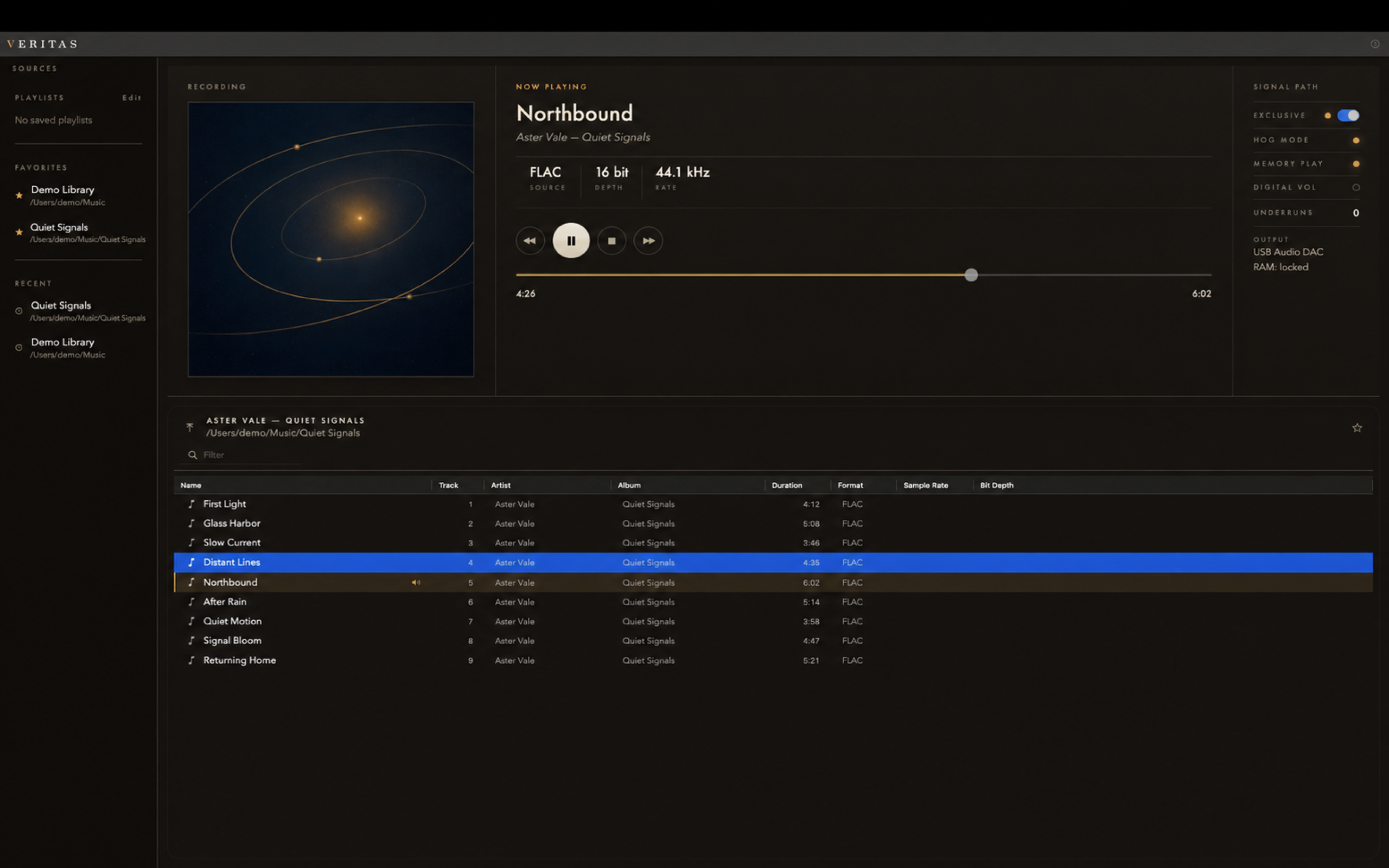
VERITASは、Macに保存した音楽ファイルをフォルダから選んで再生する、macOS用オーディオプレーヤーです。
ストリーミングサービスの代わりではなく、手元のローカル音源を自分のフォルダ構成のまま聴くことを想定しています。現在見ているフォルダと再生中の音楽を別々に扱うため、再生を続けたまま別の場所を探せます。
このページでは、Mac App Store版の入手方法と、利用時のサポート情報をまとめます。対応環境や問い合わせ方法などに変更があった場合は、随時更新します。
Mac App Store版について
Mac App Store版は無料でダウンロードでき、起動から60分のTrialとして再生機能を確認できます。Trial終了後は新しい再生を開始できず、曲の終了後に次の曲へ自動で進みません。
アプリ内の「VERITAS Full Version」を一度購入すると、時間制限と連続再生の制限が解除されます。サブスクリプションではありません。
Early Access製品版をご購入済みで、Mac App Store版への移行案内が必要な方は、下記のContactフォームからお問い合わせください。
主な機能
- ファイルやフォルダを開く、またはドラッグ&ドロップして再生
- RecentとFavoritesから、よく使う場所へ移動
- 再生を続けたまま別のフォルダをブラウズ
- アプリ内プレイリストの作成・保存・編集
- Music.app / iTunes、M3U / M3U8、PLS、XSPFからのプレイリスト取り込み
- 出力デバイスの選択
- Exclusive / Sharedの実際の動作状態を表示
- フォルダ移動、検索、再生、シークなどのキーボード操作
- ユーザー操作によるサポート診断情報の書き出し
Exclusive Modeは、選択した機器とMacの状態で利用できる場合に使われます。利用できない場合はShared Modeで再生し、画面には実際に成立している状態を表示します。
対応環境とファイル形式
- 対応OS: macOS 15.5以降
- 対応ファイル: FLAC、MP3、AIFF / AIF、WAV、M4A、CAF、ALAC
対応する拡張子であっても、実際の再生可否はファイルの内容とmacOS側の対応状況により異なります。
サポート
お問い合わせは、MessAboutWithTechnoのContactフォームからお願いします。
不具合についてお問い合わせいただく際は、次の情報があると状況を確認しやすくなります。
- VERITASのバージョン
- macOSのバージョン
- 問題が起きる直前に行った操作
- 画面に表示されたメッセージ
- 使用していた出力デバイス
購入履歴の詳細、Apple Accountのパスワード、音楽ファイルそのものは送らないでください。
サポート診断情報を書き出す
VERITASのメニューから Help > Export Support Diagnostics… を選ぶと、診断情報をファイルへ保存できます。このファイルは自動送信されません。内容を確認し、必要な場合だけ問い合わせに添付してください。
診断情報には、VERITASとmacOSのバージョン、出力・再生・ライセンス状態などが含まれる場合があります。完全な音楽ファイルのパス、bookmarkの生データ、ライブラリ一覧は意図的に含めていません。
購入を復元する
過去の購入を復元する場合は、購入画面から Restore Purchases を選びます。購入時と同じApple AccountでApp Storeにサインインしていることも確認してください。
ファイルやフォルダを開けない場合
VERITASはmacOSのApp Sandbox内で動作し、ユーザーが選択したファイルやフォルダへの許可を使います。ファイルの移動・改名後や、現在の許可範囲外にあるファイルでは、フォルダの再選択が必要になることがあります。
プライバシーについて
VERITASは、ユーザーが選んだローカルファイルをmacOSの権限内で扱います。独自の広告・解析SDK、VERITASアカウント、音楽ファイルのアップロード機能はありません。購入と購入状態の確認にはAppleのStoreKitを使用します。
詳細は、VERITAS プライバシーポリシーをご確認ください。
よくある質問
VERITASはどのようなアプリですか?
Macに保存したローカル音源を、フォルダから選んで再生するmacOS用オーディオプレーヤーです。フォルダ中心のブラウズ、プレイリスト、出力デバイス選択に対応しています。
Apple Musicなどのストリーミング楽曲を再生できますか?
ストリーミング再生には対応していません。Music.app / iTunesのプレイリスト取り込みは、Mac上のローカルファイルとして参照できる曲をVERITASのプレイリストへ取り込むための機能です。クラウドのみの曲は未解決項目になる場合があります。
Full Versionはサブスクリプションですか?
いいえ。Full Versionは一度購入する非消耗型のアプリ内課金です。
Exclusive Modeは常に利用できますか?
いいえ。選択した出力機器やMacの状態によってはShared Modeへ切り替わります。VERITASは希望設定ではなく、実際に成立している状態を表示します。
どこから入手できますか?
VERITASのMac App Storeページから入手できます。macOS 15.5以降が必要です。
関連ページ
VERITAS for the Mac App Store — Release and Support
Availability — September 30, 2026
VERITAS 1.5 is available on the Mac App Store. View VERITAS on the Mac App Store
VERITAS is a macOS audio player for browsing and playing music files stored locally on your Mac.
It is not a streaming service. It is intended for listeners who keep a local music library and prefer to browse it in its existing folder structure. Browsing and active playback are kept separate, so you can look elsewhere without replacing the music that is already playing.
This page provides the Mac App Store download link and support information. It will be updated when system requirements or support details change.
Mac App Store version
The Mac App Store version is free to download and includes a 60-minute Trial playback session from app launch. When the Trial ends, new playback cannot be started and automatic advance to the next track is disabled.
A one-time, non-consumable “VERITAS Full Version” purchase removes the time and continuous-playback limits. It is not a subscription.
If you purchased the Early Access full version and need migration information for the Mac App Store version, please use the contact form below.
Main features
- Open files or folders, or start playback with drag and drop
- Return to frequently used locations through Recent and Favorites
- Browse another folder without replacing active playback
- Create, save, and edit internal playlists
- Import playlists from Music.app / iTunes, M3U / M3U8, PLS, and XSPF
- Select an output device
- Display the effective Exclusive or Shared output state
- Use keyboard commands for folder navigation, search, playback, and seeking
- Export support diagnostics only when you choose
Exclusive Mode is used only when it is available with the selected device and the current Mac state. If it is unavailable, VERITAS plays in Shared Mode and displays the effective state.
System requirements and supported files
- Operating system: macOS 15.5 or later
- File extensions: FLAC, MP3, AIFF / AIF, WAV, M4A, CAF, and ALAC
Actual playback support depends on the file contents and the audio formats available through macOS.
Support
For support, use the MessAboutWithTechno contact form.
When reporting a problem, please include:
- the VERITAS version;
- the macOS version;
- the action immediately before the problem;
- any message shown on screen; and
- the output device in use.
Do not send purchase-history details, Apple Account passwords, or audio files.
Exporting support diagnostics
Choose Help > Export Support Diagnostics… in VERITAS to save a diagnostics file. It is never sent automatically. Review it first and attach it only when needed.
Diagnostics may include the VERITAS and macOS versions and output, playback, and license state. Complete music-file paths, raw bookmark data, and library listings are intentionally omitted.
Restoring a purchase
Choose Restore Purchases in the purchase window and confirm that the App Store is signed in with the Apple Account used for the original purchase.
When a file or folder cannot be opened
VERITAS runs inside the macOS App Sandbox and uses access granted to files and folders you select. A folder may need to be selected again after files are moved or renamed, or when they are outside the current authorization scope.
Privacy
VERITAS handles user-selected local files within macOS permission boundaries. It contains no independent advertising or analytics SDK, VERITAS account, or music-file upload feature. Apple StoreKit is used for purchase and purchase-state operations.
For details, see the VERITAS Privacy Policy.
Frequently asked questions
What is VERITAS?
VERITAS is a macOS audio player for browsing and playing locally stored music by folder. It includes folder-first browsing, playlists, and output-device selection.
Can VERITAS play streaming tracks from Apple Music?
No. The Music.app / iTunes importer brings locally addressable tracks into a VERITAS playlist. Cloud-only items may remain unresolved.
Is the Full Version a subscription?
No. It is a one-time, non-consumable in-app purchase.
Is Exclusive Mode always available?
No. Availability depends on the selected output device and the current Mac state. VERITAS displays the effective state and falls back to Shared Mode when necessary.
Where can I download VERITAS?
VERITAS is available on the Mac App Store. It requires macOS 15.5 or later.